


Phone, computer or wall clock
Each employee clocks in the way that suits them: in the Android and iOS app, through the browser on any computer, or on the clock at the entrance. Clock-ins from the phone also record the location.
A time clock for the office and the field: employees clock in and out in real time, from the phone, the computer or a physical clock, and it all goes into one report. Setup is easy, and our support team is there for every question.
Start your free 14-day trialNo credit card needed
Companies that work with ProperTime









In the office, in the field or at home: every clock-in reaches one system, and the payroll file is ready at month end.
Each employee clocks in the way that suits them: in the Android and iOS app, through the browser on any computer, or on the clock at the entrance. Clock-ins from the phone also record the location.
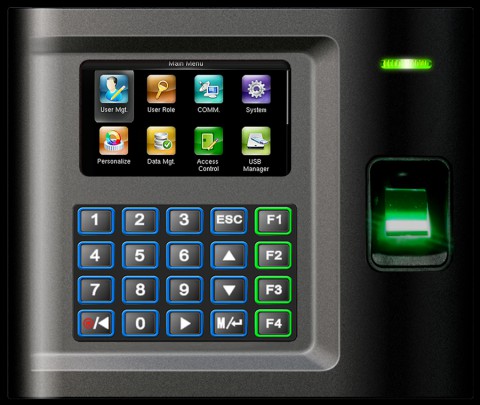
For employees who come to the same place every day. With a fingerprint, only the employee can clock in for themselves, and there is no card to leave at home.
Hours, absences and time on each task are recorded in the same system. Managers approve the reports and see in real time how many hours went to each project.
Hours reportingAt month end, you produce a payroll file ready to load into leading Israeli payroll systems, including shifts and pay supplements. Nobody retypes hours.
Payroll integrationProperTime is approved for hours reporting to the Israel Innovation Authority, and it was the first system approved for reporting from mobile.
Innovation Authority hours reportingImport your employee details and start clocking in. Our support team is there for every question, long after setup.
For employees who come through the same door every morning, a clock on the wall is the simplest way to clock in: place a finger or tap a card, and the entry is recorded. The fingerprint clock we supply, model US10C, identifies each employee by finger or proximity card, and every clock-in goes into ProperTime, into the same report as clock-ins from the phone and the computer.
An office time clock should be simple: one clock by the door for everyone who comes in, and the phone or the computer for everyone working elsewhere. Every clock-in goes into the same report, so at month end you are not collecting hours from three places.
Each employee clocks in the way that suits them, and the manager gets all the hours in one place, with no timesheets to collect and type up. In ProperTime, employees clock in from the phone, the computer or the clock at the entrance, managers see and approve every clock-in in one report, and at month end you get a payroll-ready file. Setup is simple too: import your employee details and start clocking in.
Yes. Employees clock in and out in real time, from the phone, the computer or the clock at the entrance, and every clock-in goes into the same system. When employees also report hours on tasks, managers see in real time how many hours went to each project.
A smart time clock is connected to an attendance system: employees clock in from the phone, the computer or a physical clock, and every clock-in goes into one report. In ProperTime, that report also covers absences and tasks, and at month end you produce a payroll file from it. More on the full system: attendance system.
Yes. Employees clock in with the Android and iOS app, and the clock-in location is recorded. It suits field staff, technicians and anyone working from home.
Yes. Employees clock in from the computer, in the browser, with no hardware needed. They can report from the office, from home and even from abroad.
Biometric (fingerprint), proximity card (RFID) or token. The fingerprint clock we supply, model US10C, combines fingerprint and proximity card or tag identification in the same clock.
You cancel the old card and assign the employee a new one. Hours already recorded stay in place, because they belong to the employee, not to the card. Until the new card arrives, the employee clocks in with the app or from the computer. And with a fingerprint, there is no card to lose.
Yes. Office staff clock in at the entrance or from the computer, and field staff from the phone. Every clock-in goes into the same system and the same report.
Yes. ProperTime is approved for hours reporting to the Israel Innovation Authority (formerly the Office of the Chief Scientist), and it was the first system approved for reporting from mobile. Employees clock in at the entrance, from the computer or from the phone, and all the hours go into the same system. At month end, it produces the hours report the Authority requires, by project and task. Details: Innovation Authority hours reporting.
Leave your details and we will set up your trial. Import your employee details and start clocking in, with real people supporting you along the way. No commitment, no credit card.


